Opportunities
Company Dashboard4 min read4 sections
On this page4 sections
Opportunities track potential deals through your sales pipeline — from an early prospect to a won (or lost) contract. Each opportunity belongs to a client and records the deal's value, stage, and likelihood, so you can see what's in flight and what it's worth at a glance.
Read this first: Opportunities in ApixONN are deliberately lightweight — they're a pipeline tracker, not a full CRM. You create an opportunity, move it through the stages from the list as the deal progresses, and when it's won you record the work with a Statement of Work. There's no separate detail page; you edit an opportunity from its row.
#The Opportunities list
Where to find it: Sidebar → Opportunities
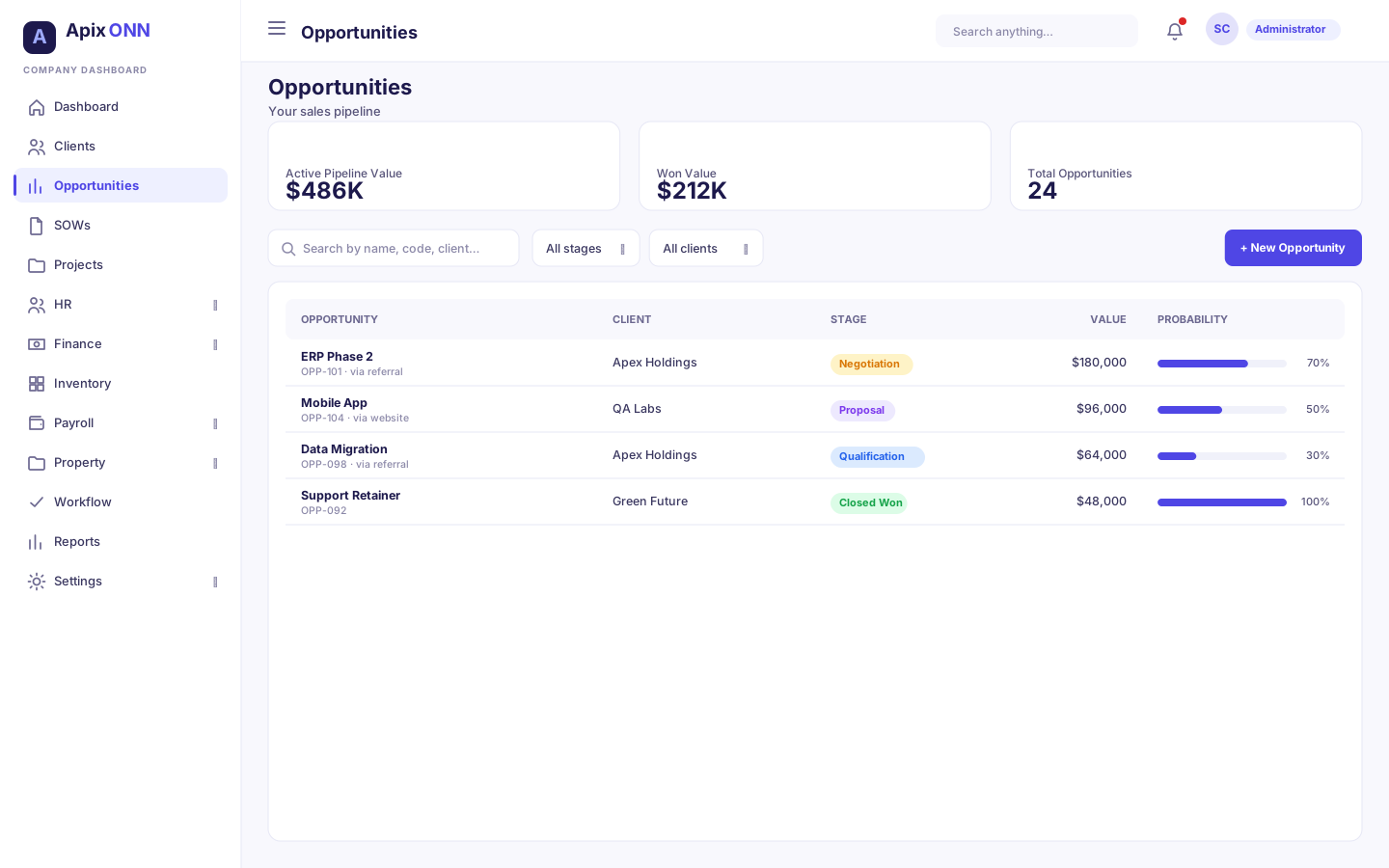
Everything lives on one screen: three summary cards across the top, then a searchable, filterable table of every opportunity.
#What you can do here
- See your pipeline at a glance in the three cards: Active Pipeline Value (the total value of open deals), Won Value (closed-won deals), and Total Opportunities (with a count of lost ones).
- Search by opportunity name, code, or client.
- Filter by Stage or by Client.
- Create a new opportunity with + New Opportunity.
- Move an opportunity to another stage, straight from the list.
- Edit or Delete an opportunity.
#Reading the table
| Column | What it shows |
|---|---|
| Code | The opportunity's system code (generated for you). |
| Opportunity | The deal name, with its source beneath (e.g. "via referral"). |
| Client | The client this deal is for — click through to their profile. |
| Stage | The pipeline stage (see below). If you can edit opportunities, the badge is also a dropdown for moving the deal. |
| Value | The estimated deal value. |
| Probability | A bar showing your estimated likelihood of winning, as a percentage. |
| Close Date | The expected close date. |
| Actions | Edit and Delete. |
Note: The three summary cards add up the opportunities in the list directly. Active Pipeline Value excludes anything already Closed Won or Closed Lost. Probability is shown for your reference only — it isn't used to weight the pipeline value (the cards use the full estimated value, not a probability-adjusted forecast).
#The stages
Every opportunity sits in one of six stages. The first four are "in progress"; the last two are the final outcomes.
| Stage | What it means |
|---|---|
| Prospecting | Early interest — you've identified a possible deal (the default for a new opportunity). |
| Qualification | You're confirming the deal is real, funded, and worth pursuing. |
| Proposal | You've put a proposal or quote in front of the client. |
| Negotiation | Terms are being worked out. |
| Closed Won | The deal was won. It drops out of the active pipeline and into Won Value. |
| Closed Lost | The deal was lost. It leaves the active pipeline. |
#How to move an opportunity to another stage
- In the list, click the deal's coloured Stage badge (its tooltip reads "Move to another stage").
- Pick the new stage. It saves straight away, and a message confirms "Moved to …".
Moving a deal to Closed Won sets its probability to 100%; Closed Lost sets it to 0%. You can move stages the same way on a client's Opportunities tab.
Note: If you can't edit opportunities, you see a plain stage badge instead of the dropdown.
#Creating an opportunity
Where to find it: Opportunities → + New Opportunity (or, from a client, the Add Opportunity button on their Opportunities tab)
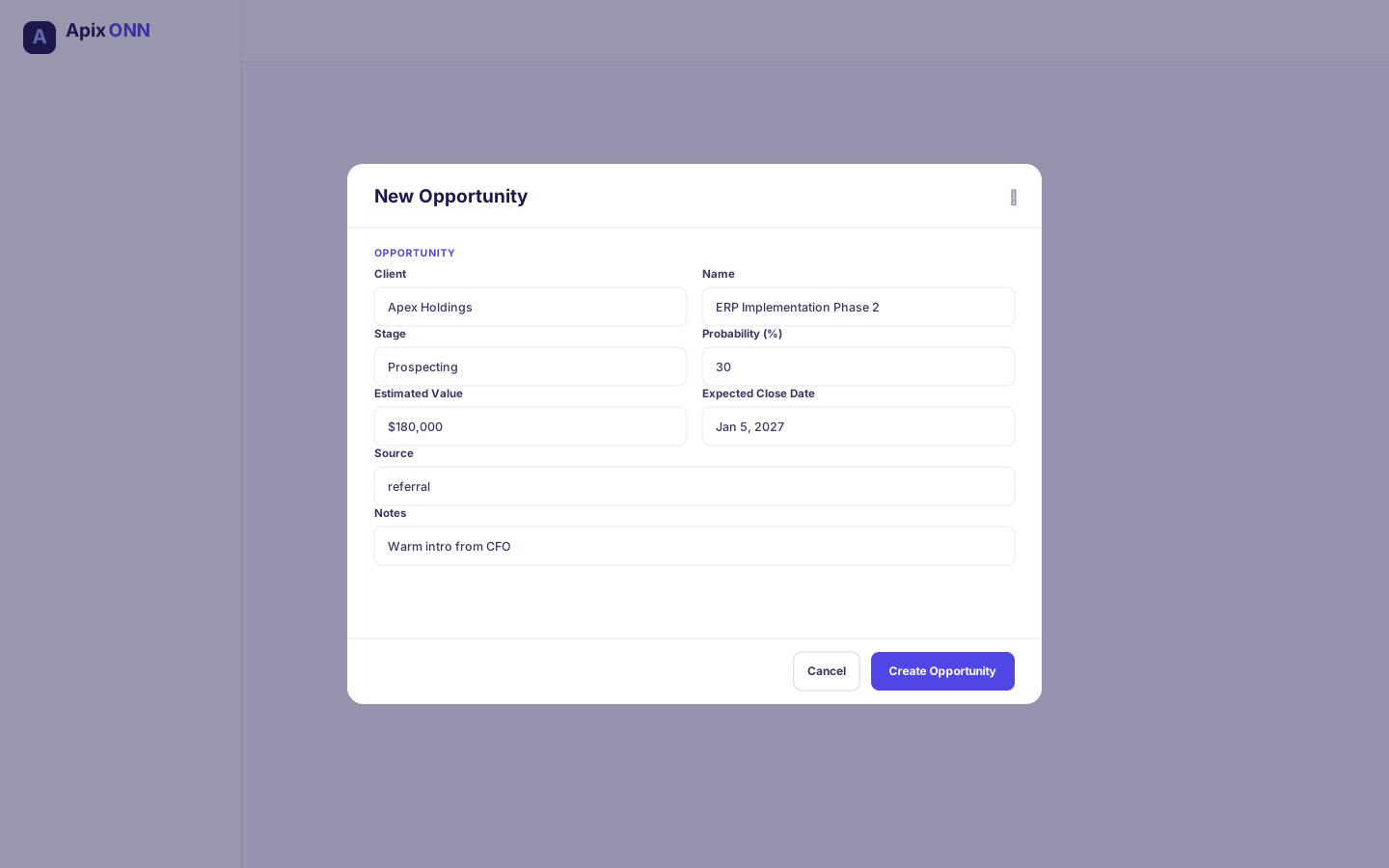
The New Opportunity form captures the whole deal in one place:
| Field | Notes |
|---|---|
| Client | Required — the client this deal is for. Search for it, or click + New client to add one. (Pre-filled when you start from a client's profile.) |
| Name | Required — a short name for the deal, e.g. "ERP Implementation Phase 2". |
| Description | Optional detail about the opportunity. |
| Stage | Defaults to Prospecting; pick any stage. |
| Probability (%) | Your estimated chance of winning, 0–100. Locked at 100 for Closed Won and 0 for Closed Lost. |
| Estimated Value | The expected deal value. |
| Expected Close Date | When you think it'll close. |
| Owner | The employee who owns the deal. Search by name. |
| Source | Where the lead came from: Referral, Website, Cold call, Event, Partner, Existing client, or Other. |
| Competitor | Who else is bidding. |
| Notes | Any extra notes. |
#How to edit an opportunity
- Click Edit on the opportunity's row.
- The Edit Opportunity form has the same fields as the create form. Change what you need — value, close date, stage, owner, and so on.
- Click Save Changes.
Important: Delete asks you to confirm and is permanent. For a deal that fell through, move it to Closed Lost instead, so it stays on record.
#How Opportunities connect to the rest of ApixONN
- Clients — every opportunity belongs to a client. It appears on the client's Opportunities tab, and the list links back to the client. Create opportunities straight from a client's profile to keep them tied together.
- SOWs — when you win a deal, create a Statement of Work and pick this opportunity as its Linked Opportunity. That's the bridge from pipeline to delivery. (The link is made from the SOW side.)
Tip: Keep the list current: move each deal to its new stage as it progresses, and update the value and close date when they change. When a deal is won, the SOW becomes the living record.